

Deal alert! Northwest will form your LLC for $39 (60% discount). See details.
All LLCs in Texas are required to file a Public Information Report (PIR) every year.
This article will explain what the Public Information Report is, and how to file it.
What is a Public Information Report?

It includes basic business details, like your LLC’s mailing address and your Registered Agent information.
And it gets filed with the Texas Comptroller, every year for the life of your LLC. The report must be filed regardless of income or business activity.
How much does the PIR cost?
The Public Information Report (PIR) costs $0. It’s free.
You just have to file a report online.
Do I have to file a Public Information Report?
Yes, you have to file a Public Information Report every year.
When is the PIR due?
The Public Information Report is due by May 15th, every year.
When is the first PIR due?
The first PIR is due the year after your LLC is approved.
For example, if your LLC is approved in February 2026, your first PIR isn’t due until May 15, 2027.
What are the penalties for not filing a Public Information Report?
If you don’t file your PIR by May 15th, your LLC will be at risk of being shut down.
And you’ll get a series of notices from the Texas Comptroller and the Secretary of State.
Here’s how it works:
1st notice
If you don’t file for 60 days after the May 15th deadline:
- The Comptroller will send you a warning notice, called the “Notice of Intent to Forfeit Right to Transact Business“.
- This lets you know that if you don’t file soon, your LLC will eventually be shut down.
2nd notice: Shutdown by Comptroller
If you still don’t file for another 60 days after the 1st warning notice:
- The Comptroller will send you a notice called the “Notice of Forfeiture of Right to Transact Business“.
- This lets you know that the Comptroller has shut down your LLC.
Note: Additionally, your LLC Members and Managers may be personally liable for LLC taxes and filings.
How to bring your LLC back to life with the Comptroller:
To bring your LLC back to life with the Comptroller, you need to:
- File the late Public Information Report (PIR).
- Pay any outstanding taxes and fees.
- Submit a Tax Clearance Letter Request for Reinstatement (Form 05-391) to the Comptroller.
- Note: Once approved, the Comptroller will send you a Tax Clearance Letter (Form 05-377).
Note: For more information, please see Texas Comptroller: Reinstating or Terminating a Business.
3rd notice: Shutdown by Secretary of State
If you don’t file for another 180 days after you’ve been shut by the Comptroller:
- The Secretary of State will send you a letter called the “Forfeiture of Registration“.
- This lets you know that the Secretary of State has shut down your LLC.
- And in order to “bring it back to life”, you must file a Reinstatement and pay the filing fee.
How to bring your LLC back to life with the Secretary of State:
(First, see the steps above for how to bring your LLC back to life with the Comptroller. You need to do this first.)
Then:
- Complete the LLC Reinstatement (Form 801) and prepare the filing fee.
- Send Form 801 (along with Form 05-377) to the Secretary of State.
Note: For more information on how to Reinstate your LLC, see Texas Secretary of State: Terminations and Reinstatements FAQs.
Do I have to file Texas Franchise Tax?
Some (but not all) LLCs in Texas need to file a Texas Franchise Tax Return.
You only need to file this if your LLC makes a certain amount of money:
- If your LLC makes more than more than $2.47 million per year, then you need to file a Franchise Tax Return (along with the Public Information Report).
- If your LLC makes less than $2.47 million per year, then you don’t need to file a Franchise Tax Return (you just need to file a Public Information Report).
How to file a Public Information Report (PIR) online
You can file a Public Information Report by mail or online.
We recommend the online filing since it’s quicker.
(However, if you prefer to file by mail, please submit Form 05-102, which you can download here: Texas Franchise Tax Forms).
Get started online using WebFile
Visit the Texas Comptroller’s online system: WebFile.
If you already have an account, please login with your username and password.
If you don’t have a WebFile account, here’s how to get one:
- Visit the WebFile login page.
- Click on “Create Profile“.
- Complete the registration information.
- Enter a few security questions.
- Then check your email and click the verification link.
Access your LLC’s Public Information Report
On your WebFile Dashboard, look for “My Taxpayer Accounts” and click on your LLC name.
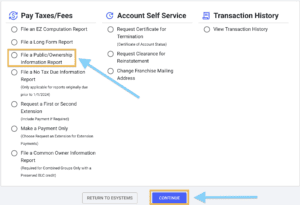
On the next page, look under the 1st column (titled “Pay Taxes/Fees“). Select “File a Public/Ownership Information Report” and click “Continue“.
Select the report year, and click “Continue“.
Note: If you receive a “no obligation” message, it might mean you (or somebody else) has already filed your PIR. We recommend calling the Comptroller at 512-463-4402 to double-check.
Current Mailing Address
What is an LLC Mailing Address? This is simply the address where you prefer to receive your business mail.
Review your LLC’s Mailing Address, and make changes if needed.
This mailing address doesn’t have to match your LLC Certificate of Formation (although it can).
This address can be:
- located in any state, or in any country
- an office address
- a home address
- a virtual office address
- a mailbox rental address
Once finished, click “Continue“.
Office Name & Principal Place of Business
Pro Tip: Both the Office Name and Principal Place of Business aren’t required, so you can leave them blank if you’d like. The Texas Comptroller will just use the Mailing Address you entered in the last step anyway.

What is an Office Name? This field can be a little confusing. Again, it’s optional, so you can leave it blank if you’d like. Or you can enter something like “Primary Office”, “Headquarters”, “Main Office”, etc.
What is a Principal Place of Business? This is the location where the majority of business activities take place. Again, this is optional, so you can leave this blank, or you can enter your business address.
The Principal Place of Business can’t be a PO box address, but it can be:
- an office address
- a home address
- a virtual office address
- a mailbox rental address
Officers, Directors, Managers, Member, or General Partner
- Related article: Member-Managed vs Manager-Managed LLC
In this section you’ll need to list either the Members or Managers (if applicable) of your LLC. It depends on how your LLC is managed.
- If your LLC is Member-Managed, enter the Member(s).
- If your LLC is Manager-Managed, enter the Manager(s).
Officer Name: Enter the LLC Member or Manager’s first and last name.
Officer Title: If they are an LLC Member, you can use the title “LLC Member” or “LLC Managing Member”. If they are an LLC Manager, use the title “LLC Manager”.
Director: Select “No”. This doesn’t apply to LLCs.
Term expiration date: Leave this blank.
Address: Enter their address. This address can be in Texas, or in any state.
Click “Add Another” to add an additional Member/Manager, or continue to the next section.
Owned Entity(s)
This section only needs to be completed if your Texas LLC owns any Child or Subsidiary companies. If so, then complete the following. If not, skip this part and go to the next section.
Name of Owned (Subsidiary) Corporation or Entity: Enter the name of the Child or Subsidiary company.
State of Formation: Enter the state where this company was formed.
TX SOS File Number: If this company is registered to do business in Texas, enter its SOS File Number. If not, leave this blank.
Percent: Enter how much of the subsidiary company is owned by your Texas LLC.
Click “Add Another” to add another company, or go to the next section.
Owned by, Corporation
This section only needs to be completed if your Texas LLC is owned by a Parent or Holding Company. If so, then complete the following. If not, skip this part and go to the next section.
Name of Owning (Parent) Corporation or LLC: Enter the name of the Parent or Holding Company.
State of Formation: Enter the state where this company was formed.
TX SOS File Number: If the company is registered to do business in Texas, enter its SOS File Number. If not, leave this blank.
Percent: Enter how much of your Texas LLC is owned by the Parent/Holding company.
Click “Add Another” to add another company, or go to the next section.
Registered Agent & Office
In this section, you’ll see your Texas Registered Agent information.
Unfortunately, you can’t change your Registered Agent’s name here. The only thing you can change/update is their address.
If you want to change your Registered Agent, that can only be done with the Texas Secretary of State.
Note: If you need to change your Registered Agent with the Secretary of State, you can do so by mail (Form 401) or online (via SOSDirect). It costs $15 to change your LLC’s Registered Agent.
Declaration Statement
Check the box agreeing to the terms and then click “Continue“.
Review
Review your information.
If you need to make edits, click “Edit” link.
Submit Filing
Click “Continue” to submit your Public Information Report.
Approval
Congratulations. You have filed your Texas LLC Public Information Report.
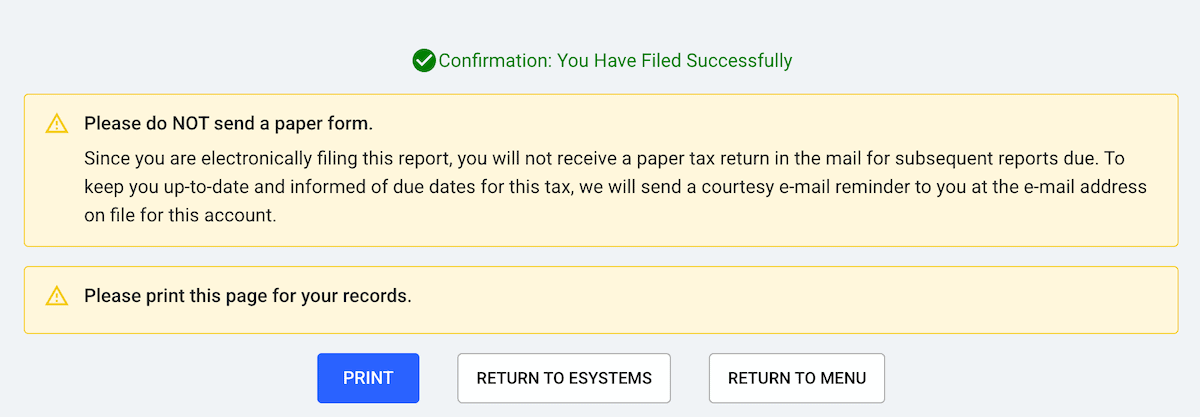
You should see a confirmation page. You can print/save this page for your records if you’d like. It’ll also be saved in your WebFile account’s history.
Here’s what you’ll see at the top of the confirmation page:
Public Information Report Reminders
Remember, you must file your LLC’s Public Information Report every year.
We recommend putting a repeating reminder on your phone, computer, and/or calendar.
Here’s a video on how to use Google Calendar to create reminders:

Texas Comptroller Contact Info
If you have any questions about filing your LLC’s Public Information Report, you can contact the Texas Comptroller at 512-463-4402.
Their office hours are Monday through Friday, 8am to 5pm Central Time.
Texas Public Information Report FAQs
Does my LLC need to file an Ownership Information Report (05-167)?
No. Form 05-167 is not for LLCs. It’s for other entities.
Texas LLCs need to file a Public Information Report (Form 05-102) instead. The instructions are above on this page.
Do Texas Veteran LLCs have to file a Public Information Report?
If your Texas Veteran LLC was approved between 1/1/2022 and 12/31/2025, then no, you don’t have to file a PIR (for the first 5 years of existence).
If your Veteran-owned LLC was approved before (or after) those dates, then yes, you’ll need to file a PIR.
Do I still have to file a No Tax Due Report with my PIR?
No, you don’t have to file a No Tax Due Report with your PIR.
Texas used to require a No Tax Due Report (for LLCs’ making less than $2.47 million per year).
However, as of 2024, that is no longer required.
References
Texas Administrative Code: Subchapter V
Texas Comptroller: Tax Notices and Resolving Problems with Your Account
Texas Comptroller: New Veteran-owned Businesses and Texas Franchise Tax
Texas Comptroller: Public Information Report and Ownership Information Report
Information verified on October 27, 2026
Matt holds a Bachelor's Degree in business from Drexel University with a concentration in business law. He performs extensive research and analysis to convert state laws into simple instructions anyone can follow to form their LLC - all for free! Read more about Matt Horwitz and LLC University.