

Deal alert! Northwest will form your LLC for $39 (60% discount). See details.
Statement of Information for California LLCs
Every California LLC is required to file a Statement of Information (sometimes referred to as a “Biennial Report”) every 2 years.
Your first Statement of Information is due within 90 days of your LLC being approved.
This is required in order to keep your LLC in good standing with the California Secretary of State.
California LLC Statement of Information fee
There is a $20 fee to file a Statement of Information.
Preferred method of filing
As of 2025, the California Secretary of State only accepts LLC Statement of Information filings online via BizFile.
What’s the purpose of the Statement of Information?
The purpose of the Statement of Information is to keep your California LLC’s contact information up to date with the Secretary of State.
When is my LLC Statement of Information due?
- Your first Statement of information is due within 90 days of your LLC being approved by the state.
- After that, it’s due every 2 years for the life of your LLC.
First Statement of Information:
Your first California LLC Statement of Information is due within 90 days of your LLC’s approval date.
You can find your LLC’s approval date by:
- looking at your approved Articles of Organization
- or by doing a business search and looking for the “registration date”
Ongoing Statements of Information:
After your first Statement of Information is filed, you are required to file a Statement of Information every 2 years. It’s due by your LLC’s anniversary date.
For example, if your California LLC was approved on August 10th 2026:
- August 10th is your anniversary date
- Your first Statement of Information is due by November 8th 2026 (90 days from August 10th)
- Ongoing Statements of Information are due every 2 years, due by your anniversary date (August 10th 2028, August 20th 2030, August 20th 2032, and so on)
Is there a penalty if I don’t file an LLC Statement of Information?
Yes, there is a penalty.
The Secretary of State will give you a 60-day grace period (counted from the date you have been notified for failure to file) within which you must file the Statement of Information.
If you fail to file within the 60-day grace period, you have to pay a $250 penalty.
(Source: Common penalties and fees; see “Statement of Information penalty”)
If you continue to ignore this requirement, the Secretary of State may administratively dissolving (shut down) your LLC.
Statement of Information reminders
The Secretary of State will send a postcard reminder (by regular mail) to your LLC’s business address 1 to 2 months before the due date.
However, this is a courtesy reminder and even if you don’t receive one, it is still your responsibility to file all your Statements of Information on time.
For this reason, we recommend:
- putting a repeating reminder on your phone and/or computer
- and bookmarking this page
How early can I file?
First Statement of Information:
Again, your first Statement of Information is due within 90 days of your LLC being formed. You can file this Statement of Information as soon as your LLC is approved.
Ongoing Statements of Information:
You can file your ongoing Statements of Information up to 6 months before the due date.
For example, if your next Statement of Information is due by August 10th 2026, you can file it as early as February 10th 2026.
And the same thing applies for upcoming years.
For example, in 2028, you can file your Statement of Information anytime between February 10th 2028 and August 10th 2028.
How to file your Statement of Information online
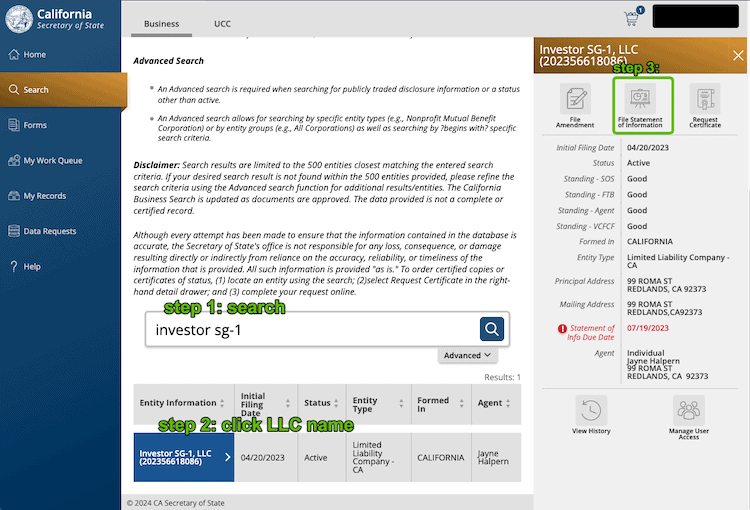
Get started:
- Go the Secretary of State’s BizFile page, scroll down, and click “File Online” (a new tab will open)
- Click “Login” in the upper right.
- Click “File a Statement of Information“
- Search for your LLC either by its name or Entity Number
- Click on your LLC name, and then click File Annual Report
- You may need to “Request Access” if your BizFile account isn’t connected to your LLC
- Login to your BizFile account and continue the filing.
- Review the privacy message and agree to the terms
Submitter Information
Enter the name and contact information for the person submitting the Statement of Information.
The Secretary of State will use this information to contact you with questions about the filing, if they have any.
Note: This section is optional, so you can skip it if you prefer.
Entity Information
There’s nothing to do on this page. It just displays your LLC information.
Business Address – Street Address of Principal Office of LLC
- Related article: Domestic LLC versus Foreign LLC
Review your LLC’s Principal Office address and make any changes if necessary.
Domestic LLC: If your LLC was formed in California, you can enter the same address that you listed in your Articles of Organization (your LLC’s Designated Office address).
Foreign LLC: If your LLC was formed in another state and is registered to do business in California, enter your LLC’s Principal Office. For most Foreign LLCs, this is usually the LLC address in the state in which it was formed.
Some notes about your LLC’s Principal Office address:
- It must be a street address
- It can’t be a PO Box address
- It can be a home address
- It can be an office address
- It can be a friend or family member’s address
If you want to keep your address off public records:
- If you hired the California Registered Agent we recommend, you can use their address for your LLC’s Principal Office address
Business Address – Mailing Address of LLC
Review your LLC’s Mailing Address and make any changes if necessary. The Mailing Address is used to receive paperwork from the state.
If needed, your LLC’s Mailing Address can be the same as its Principal Office address. But it doesn’t have to be.
Some notes about your LLC’s mailing address:
- You can use any address you’d like, as long as you can get mail.
- It can be located in the U.S. or outside the U.S.
- The address can be a PO box address.
Business Address – Street Address of California Office of LLC
If applicable, update or enter your LLC’s California Office address. This only applies to LLCs with a principal office not in California.
Note: This section is optional, and it can be skipped.
Manager(s) or Member(s)
- Related article: Member-managed vs Manager-managed LLC
If your LLC is Manager-managed, you only need to enter the Manager(s) information.
If your LLC is Member-managed, you only need to enter the Member(s) information.
Add your LLC’s first Manager/Member.
Then add any additional Manager(s) or Member(s), if needed.
Agent for Service of Process
Note: Agent for Service of Process is the same thing as a Registered Agent.
- Related lesson: California Registered Agent
Review your LLC’s Registered Agent information and make any changes if needed.
Type of Business
- Related article: LLC business purpose statement
Enter, or edit, the brief description of your LLC’s primary business activity. You can enter a few words or a sentence or two to explain your LLC’s primary business activity.
If your LLC is engaged in multiple business activities, just enter the primary one. Your Information Statement doesn’t have to list every single thing your business does.
Email Notifications
Also on the Type of Business page is the option to request Email Notifications from the Secretary of State. This includes reminders about filings that are due and other notifications.
We recommend entering your email address (twice) in order to get an “approved” copy of your LLC’s Statement of Information by email. Otherwise, they will send it by USPS mail.
Chief Executive Officer
Note: This section is optional. It can be filled in or left blank.
The state defines a CEO as either:
- a person — besides the LLC member(s) or manager(s) — who is appointed to run the company
- or the highest level position in the LLC’s organization in charge of management
If you’d like to enter a CEO for your LLC, you can do so here.
Most filers prefer to leave this information off public record, so they skip this section and leave it blank.
Labor Judgment
This page asks whether any manager or member of your LLC has judgments against them from a Labor Code violation. That includes things like wage disputes, occupational safety, and other employment issues. The judgment could be from a court or from the Division of Labor Standards Enforcement.
Answer Yes or No.
Review and Signature
Review:
Review the information you entered for accuracy. Check for any typos (and go back to make any changes if needed).
Signature:
Once finished, at the bottom of the page, check off the box agreeing to the terms. Then click “Add“. Enter the name of the person signing the Statement of Information. Then click “Save“.
Click “Next Step” to proceed.
Processing Fee Information
The next page shows the total amount due ($20).
Optional (Certified Copy): You have the option of adding a Certified Copy of the filing for an extra $5. This isn’t necessary, and we don’t recommend it. The regular filed copy of the Statement of Information is fine.
File Document
Click “File Online“.
Payment
You’ll see a pop-out on the right side. Click “Pay with Credit Card“.
Enter your billing information and submit your payment to the state.
Congratulations! Your California LLC Statement of Information has been sent to the Secretary of State.
Statement of Information Approval (online filing)
When filed online, your Statement of Information is processed and approved immediately.
You’ll see a popup appear and you can download the following 3 items:
- Receipt
- Form (the actual Statement of Information)
- Business Entity Filing Acknowledgment
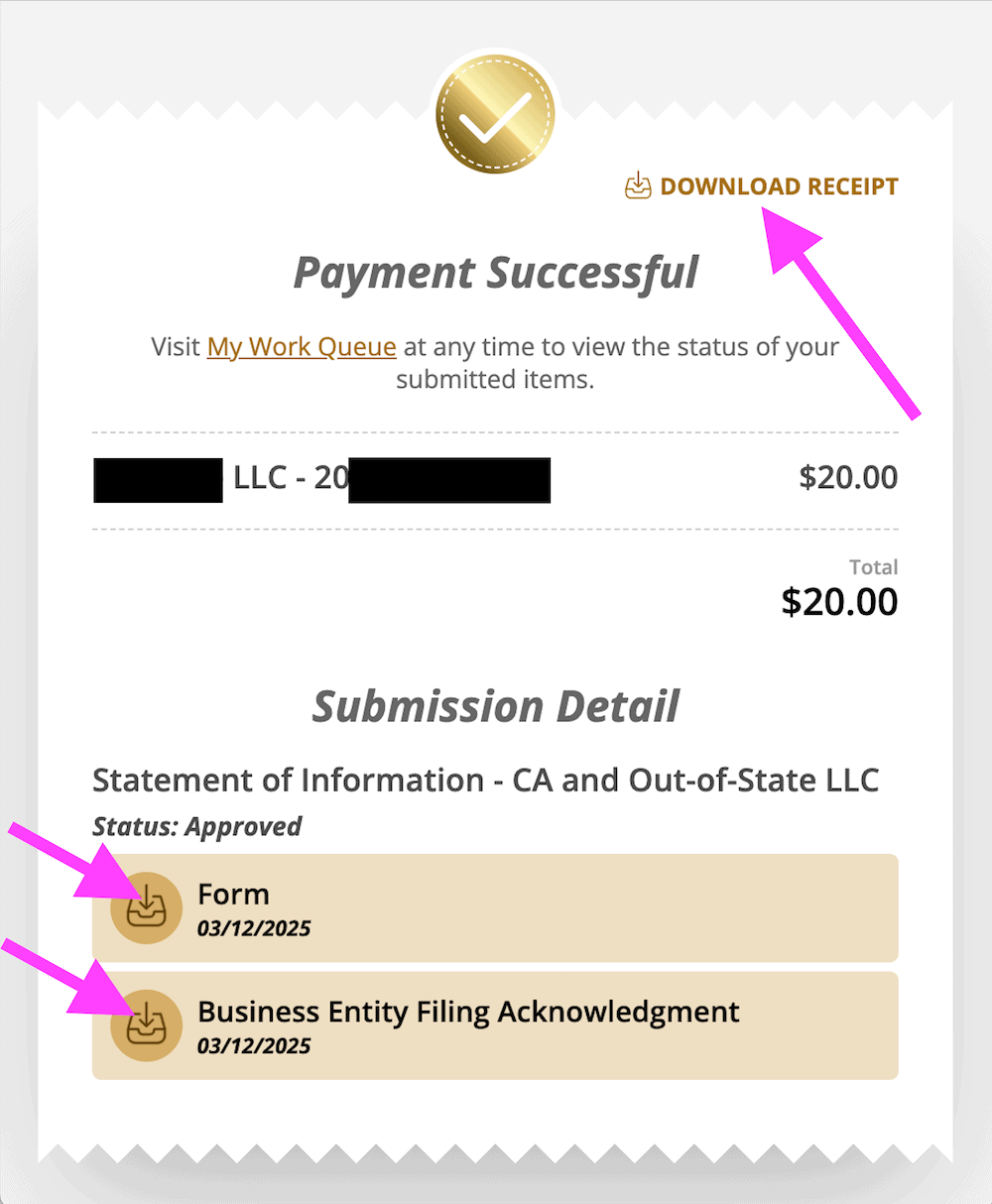
Note: Technically, these aren’t super important, and you don’t need to save them. Your filed and approved Statement of Information is stored on the state’s business database and you (or the state) can access and download at anytime. Having said that, it doesn’t hurt to save these files with your business records.
File again 2 years from now
Don’t forget to file your Statement of Information again in 2 years.
I recommend setting a calendar reminder :-)
California Secretary of State Contact Info
If you have any questions, you can contact the California Secretary of State at 916-657–5448. Their hours are Monday through Friday from 8am to 5pm, Pacific Time.
References
California Corporations Code: Section 19141
California Secretary of State: About Bizfile
California Secretary of State: Service Options
California Corporations Code: Section 17713.07
California Corporations Code: Section 17702.09
California Secretary of State: Current Processing Dates
California Secretary of State: Forms, Samples, and Fees
California Secretary of State: Statements of Information
California Secretary of State: Starting a Business Checklist
California Franchise Tax Board: Common penalties and fees
California Secretary of State: Bizfile California Press Release
California Secretary of State: Statement of Information Help
California Secretary of State: Limited Liability Company Filing Tips
California Secretary of State: Business Programs Contact Information
Information verified on October 27, 2026

Matt holds a Bachelor's Degree in business from Drexel University with a concentration in business law. He performs extensive research and analysis to convert state laws into simple instructions anyone can follow to form their LLC - all for free! Read more about Matt Horwitz and LLC University.