

Deal alert! Northwest will form your LLC for $39 (60% discount). See details.

This is the document that officially forms your Massachusetts LLC.
You can file your Massachusetts Certificate of Organization by mail or online.
- If you file by mail, the filing fee is $500.
- If you file online, the filing fee is $520.
Need to save time? Hire a company to form your LLC:
Northwest ($39 + state fee) or LegalZoom ($149 + state fee)
(We recommend Northwest. We've reviewed all the top companies in the industry. And Northwest is our #1 pick for prices, customer support, and address privacy. Check out Northwest vs LegalZoom to learn more.)
The “LLC filing fee” (the fee to create a Massachusetts LLC) is the same thing as the “Certificate of Organization fee”. The Certificate of Organization is the document that, once approved by the Secretary of State’s office, creates your Massachusetts LLC.
How much is an LLC in Massachusetts explains all the fees you’ll pay, including the Certificate of Organization filing fee.
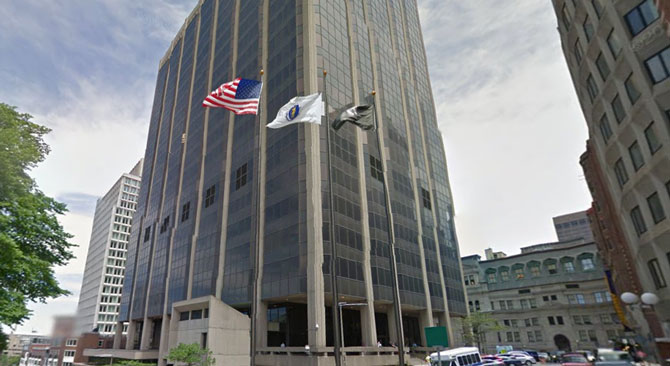
(Massachusetts Secretary of the Commonwealth, Corporations Division Building)
Regardless of how you file your Certificate of Organization, the state will process and approve your LLC within 1-2 business days.
Note: Filing times may take longer due to government delays. For the most up-to-date LLC processing times, check how long does it take to get an LLC in Massachusetts.
Online filing vs mail filing
Below, you will find instructions for the online filing. We recommend filing online as it’s faster and easier than the mail filing.
Alternatively, if you want to hire someone to form your LLC for you, check out Best LLC Services in Massachusetts.
Prefer to file by mail instead?
If you prefer to file by mail, the instructions on this page still apply to the paper form.
Here are the steps to forming an LLC by mail:
- Download the Certificate of Organization (Form D)
- Fill the form out on your computer or by hand (using a blue or black pen)
- Print it on regular white paper (8.5″ x 11″)
- Sign the form
- Prepare a check or money order for $500 (made payable to “Commonwealth of Massachusetts”)
- Mail your signed Certificate of Organization and payment to: Secretary of the Commonwealth, One Ashburton Place, Room 1717, Boston, Massachusetts 02108-1512
Approval:
When filing by mail, the Commonwealth of Massachusetts will not mail anything back once your LLC is approved. Instead, you’ll need to wait 1-2 business days (plus allow a few days for mail time).
Then, search for your LLC online (via the Business Entity Search). Click on your LLC name, and scroll down to the “View filings for this business entity” section. Then click “Certificate of Organization”, and then click the “View Filings” button.
Notes:
- If you cannot find your LLC filing online, or do not receive a rejection letter within about a week, you can call the Massachusetts Secretary of the Commonwealth at 617-727-9640.
- We recommend saving/printing a few copies of your Certificate of Organization (both physical and digital) and keeping them with your business records.
- If your LLC is rejected for any reason, the state will mail you a letter letting you know what needs to be changed.
Massachusetts Certificate of Organization (Online filing instructions)
Before you continue: Make sure you have searched your LLC name and selected your Massachusetts Registered Agent.
Get Started
Visit the Corporations Division Online Filing System.
To the right of “If you are forming a new entity“, click the “here” link.
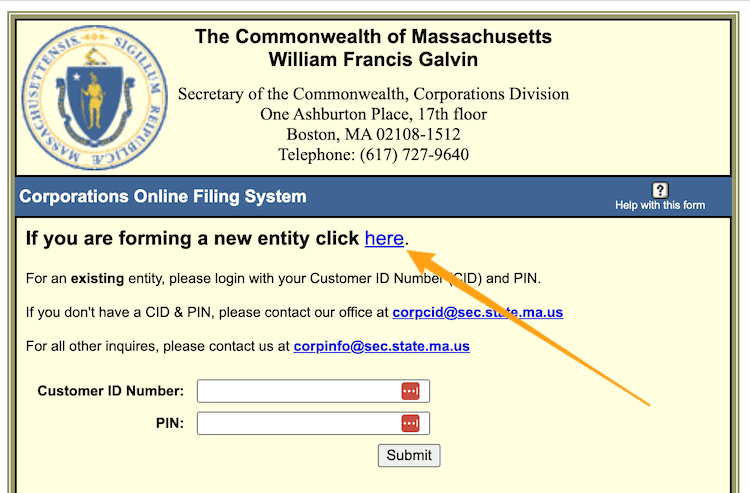
Then underneath “Domestic Limited Liability Company (LLC)”, click “Certificate of Organization“.
1. Name of your LLC
Enter your LLC name exactly as you would like it.
Include your preferred capitalization, as well as the designator “LLC” or “L.L.C.” (the abbreviation “LLC” is the most common).
Note: You can use a comma in your Massachusetts LLC name or you can leave it out. Ex: “ABC Widgets, LLC” and “ABC Widgets LLC” are both acceptable.
2a. Principal Office Address
Enter your LLC’s Principal Office Address.
This can be a home address, an office address, or the address of your LLC’s Resident Agent (aka Registered Agent).
Note: Make sure to enter “USA” in the “Country” field.
2b. Address where your LLC’s Records will be Maintained
I know this sounds a bit repetitive, but a few businesses might have a different address where official records are kept.
For most people though, this address will be the same thing you entered in 2a above. If that’s the case, select “Principal Office” from the drop down menu.
3. General Character of your Business
Enter the purpose of your LLC.
It doesn’t have to be extremely specific (unless you want it to be), and you are not going to be forced to do this forever. You can change the purpose of your business as it grows.
You can enter just a few words (ex: “pizza shop”, “real estate investing”, “landscaping”, etc.) or a few sentences.
Note: Massachusetts doesn’t allow for a “general use” clause (ex: “Any and all purposes for which an LLC can be formed”). If you use this, your LLC will be rejected. Instead, you must enter something specific.
4. Dissolution
In this section, you need to let the Massachusetts Secretary of the Commonwealth know about the duration of your LLC (how long it will remain in existence).
If you prefer for your LLC to be “open-ended” with no set closure date, leave #4 blank.
Most people leave #4 blank as this gives them the freedom to close their LLC at any time in the future (by filing dissolution paperwork).
If you prefer for your LLC to be automatically shut down on a specific date in the future, enter that specific date here.
5. Name and Street Address of Resident Agent (aka Registered Agent)
- Related article: If you’re not sure who can serve as your Massachusetts Registered Agent, please refer to this page: Massachusetts Registered Agent.
Notes
- Resident Agent is the same thing as Registered Agent. Massachusetts just uses the term Resident Agent.
- You can learn more about the role of a Registered Agent here: Registered Agent vs LLC Organizer.
Enter the exact name of your Resident Agent in the first box and their street address in the second box (PO boxes are not allowed).
If your Resident Agent is an individual, they must be a resident of Massachusetts. If your Resident Agent is a company, they need to be authorized to do business in Massachusetts.
Resident Agent Consent
To the right of “I,” enter the exact name of your Resident Agent again.
6. Name and Address of Managers (if your LLC is Manager-Managed)
If your LLC is Manager-managed, enter the name and address of the manager(s) and then click “add”.
If your LLC is Member-managed, you can leave this section blank.
Note: Most LLCs are Member-managed, where all the owners run the business and day-to-day operations. An LLC can also be Manager-managed, where one, or a few designated people, run the business and day-to-day operations (while the Members play more of a passive/investor role).
To learn more about Member-managed LLCs vs. Manager-managed LLCs, please see Member managed LLC vs Manager managed.
7. Name and Address of Authorized Signer(s) (if your LLC is Member-Managed)
If your LLC is Member-managed, enter the name and address of each person authorized to sign documents on behalf of the LLC and then click “add”. This will most likely be you and any additional Members.
If your LLC is Manager-managed, you can leave this section blank, or enter any additional authorized signer’s name and address (in addition to those listed in #6).
8. Name and Address of Authorized Signer(s) (for Real Estate)
If your LLC is involved in real estate transactions, enter the name and address of all members/managers who are authorized to sign real estate documents and then click “add”.
If your LLC is not involved in real estate transactions, you can leave #8 blank.
9. Additional Matters
This section is used to add additional rules and regulations to your Massachusetts LLC.
This section is not required, and most people leave it blank.
Filer’s Contact Information
Enter your name in the “Contact Name” box.
Leave “Business Name” blank.
Enter your street address (if different from the Principal Office Address listed in 2a). If your address is the same as the Principal Office Address listed in 2a, select that same address from the drop down menu on the right.
Enter your phone number and email address.
Signature
Type your full name under the signature box.
Then select “Accept“.
Then click the “Click HERE to submit this information” button.
Summary and Review
On the next page, review the information for accuracy and check for typos.
If you need to make any changes, click the “Make Corrections” button at the lower left of the page.
If no changes are needed, click the “Accept” button at the lower right of the page to proceed.
Payment Method
Click the “Enter Payment Details” button.
On the next page, click the “PAY” button.
Enter your credit card and billing information.
Then submit your payment to the state.
Congratulations! Your Massachusetts LLC has been filed for processing.
Now you just need to wait for approval.
Massachusetts LLC Approval
Approval:
When filing by mail, the Commonwealth of Massachusetts will not mail anything back once your LLC is approved. Instead, you’ll need to wait 1-2 business days.
Then, search for your LLC online (via the Business Entity Search). Click on your LLC name, and scroll down to the “View filings for this business entity” section. Then click “Certificate of Organization”, and then click the “View Filings” button.
Notes:
- If you can’t find your LLC filing online, or don’t receive a rejection letter within about a week, you can call the Massachusetts Secretary of the Commonwealth at 617-727-9640.
- We recommend saving/printing a few copies of your Certificate of Organization (both physical and digital) and keeping them with your business records.
- If your LLC is rejected for any reason, the state will mail you a letter letting you know what needs to be changed.
Massachusetts LLC bank account
You’ll use your Certificate of Organization and your Federal Tax ID Number to open a business bank account for your LLC.
Massachusetts Secretary of the Commonwealth Contact Info
If you have any questions, you can contact the Massachusetts Secretary of the Commonwealth at 617-727-9640. Their hours are Monday through Friday from 8:45am to 5:00pm, Eastern Time.
Search your domain name
If you plan on building a website, you can quickly register your domain name. Creating a website with your business name as the domain name can help people find your business online. You can easily search and purchase a domain name through GoDaddy.
Find a domain name
References
Massachusetts LLC Act
Massachusetts LLC Laws and Regulations
Massachusetts Secretary of State: LLC Information
MA Tax Requirements and Registration for Limited Liability Companies
Information verified on October 27, 2026

Matt holds a Bachelor's Degree in business from Drexel University with a concentration in business law. He performs extensive research and analysis to convert state laws into simple instructions anyone can follow to form their LLC - all for free! Read more about Matt Horwitz and LLC University.