

Deal alert! Northwest will form your LLC for $39 (60% discount). See details.
File your Articles of Organization to form an LLC in Michigan

What are Articles of Organization for an LLC in Michigan?
The Articles of Organization is the document that creates your Michigan LLC.
Once approved by LARA, your LLC will officially go into existence!
Methods of filing
You can file the Michigan Articles of Organization online or by mail.

(Michigan Secretary of State, Department of Licensing and Regulatory Affairs Building)
Need to save time? Hire a company to form your LLC:
Northwest ($39 + state fee) or LegalZoom ($149 + state fee)
(We recommend Northwest. We've reviewed all the top companies in the industry. And Northwest is our #1 pick for prices, customer support, and address privacy. Check out Northwest vs LegalZoom to learn more.)
Michigan LLC Articles of Organization filing fee
The filing fee for an LLC in Michigan is $50.
This is a one-time fee, and it’s the same amount whether you file online or by mail.
How much is an LLC in Michigan explains all of the fees you’ll pay.
Veterans: You can form an LLC for free in Michigan. You’ll just need to submit an Affidavit and proof of your Veteran status. We’ll discuss this below.
Michigan LLC approval times
The approval time for a Michigan LLC is 7-10 business days.
This is the same for both online filings and mail filings. However, allow a few extra days for mail filings.
Note: Filing times may take longer due to government delays. For the most up-to-date LLC processing times, check how long does it take to get an LLC in Michigan.
LLC University® recommendation: We recommend the online filing as it’s easier to complete. Instructions are below.
However, if you aren’t very tech-comfortable, you can still file by mail.
Or, alternatively, you can hire an LLC formation company to file the paperwork for you. If you want to hire a company to form your LLC, check out Best LLC Services in Michigan for our recommendations.
Filing your Articles of Organization by mail
If you want to file by mail (instead of online), you need to:
- Download Form CD-700
- Prepare a check or money order for $50
- Make payable to “The State of Michigan”
- Put your LLC Name on the memo line
- Send your payment and the completed Articles of Organization to: Michigan Corporations Division, PO Box 30054, Lansing, MI 48909-7554
Mail filing video instructions (see 8min 50s):

How to file Michigan LLC Articles of Organization (online filing)
Important: Michigan’s old filing system was called the Corporations Online Filing System (COFS) and it required a Customer ID (CID) and PIN to login.
However, Michigan replaced this filing system and login in 2025.
The new online filing system is called MiBusiness Registry Portal, and you’ll login using MiLogin for Business.
If you don’t have a MiLogin for Business account, you’ll need to create one before you can form your LLC.
How to create a Michigan MiLogin for Business account
Go to the MiLogin for Business account creation page.
Email address and Name:
Enter your email address and click “Next Step“.
Retrieve the passcode from your email and enter the passcode on the MiLogin page. Then click “Next Step“.
Enter your name and check the box agreeing to the MiLogin Terms and Conditions. Then click “Next Step“.
Work phone:
Enter your preferred work number (most people just use their cell phone). Then click “Next Step“. You’ll receive a phone call with the code. Enter the code and click “Confirm Passcode“.
Mobile phone:
Enter your cell phone number (it’s okay if you entered this as your “work phone” too) and click “Next Step“. Choose your verification method, enter the code given, and then click “Confirm Passcode“.
Create your User ID:
Important: Your User ID must start with your last name followed by your first initial, and then 4 numbers.
Tip: Look at the “info box” for your username example.
For example: If your name is Susan Binkowski, your username must start with “BinkowskiS“, followed by any 4 numbers. So “BinkowskiS4455” would be acceptable.
Enter your desired User ID and click “Next Step“.
Create your password:
Enter your desired password twice. Then click “Create Account“.
Once your MiLogin for Business account is created, you can close this tab.
You’re now ready to file the Articles of Organization for your Michigan LLC.
Get started:
- Visit the MiBusiness Registry Portal.
- Click the “Login” button.
- Under “MiBusiness Registry Portal“, click “Launch service“.
- This automatically logs you in.
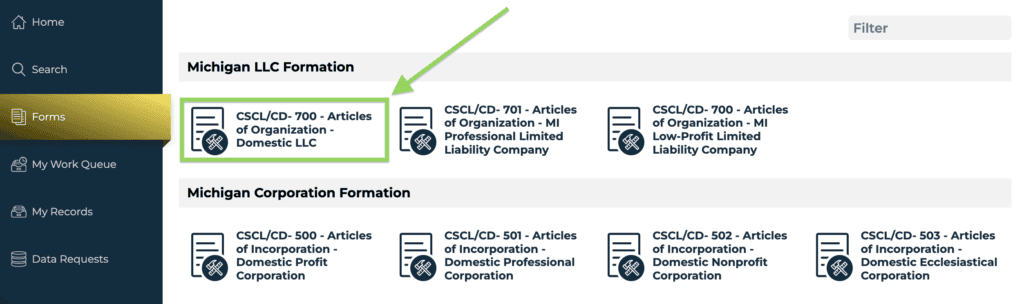
- On the left, click “Forms“.
- Click “CSCL/CD- 700 – Articles of Organization – Domestic LLC“.
- Click “File Online“.
Processing Information
Select your processing speed.
By default, your LLC will be processed in 7-10 business days. This is the “Standard Review” option.
Most people choose “Standard Review”, since this is the default (and doesn’t cost any extra money).
However, if you’d like your LLC approved faster, you can pay more for an expedited filing. The most common (and economical) expedited filing is “24 Hour Review” for an additional $50 ($100 total).
Veteran Exemption
If you’re a Veteran and qualify for a free LLC, check the box marked “I qualify for a veteran fee exemption“. Then upload your Proof of Veteran’s Status and a Fee Waiver Request form. For more information, please see Michigan Veteran LLC.
If you aren’t a Veteran, leave this box unchecked.
Then click “Next Step“.
Limited Liability Company Name
- Prior lesson: Make sure you’ve read the Michigan LLC Name Search lesson before proceeding.
A previously filed reserved name will be used for this filing.
Note: You aren’t required to reserve an LLC Name in Michigan, and we don’t recommend it. It’s usually a waste of money.
If you reserved an LLC Name:
- Click “Yes“.
- Then select your reserved name from the dropdown.
If you didn’t reserve an LLC Name:
- Click “No“.
- Then enter your desired LLC name twice, including its designator (ending).
As per Section 450.4204 of the Michigan LLC Act, your LLC name must have one of the following designators at the end:
- LLC
- L.L.C.
- LC
- L.C.
- Limited Liability Company
Tip: Most people choose “LLC”.
When you’re finished, click “Next Step“.
Note: If the Name step is highlighted in red, this usually means your LLC Name is taken. You’ll need to come up with a new LLC Name.
Purpose
- Related lesson: LLC Statement of Purpose
If you would like to list a specific purpose (optional) for your LLC, you can enter that in this box.
However, if you leave the box blank, it means your LLC will use the “all purpose clause” (aka a general purpose). This means your LLC can engage in any legal business activities.
Recommendation: We recommend leaving the box blank to use an “all purpose clause”. This gives your LLC the most flexibility.
Click “Next Step”.
Term of Duration
In this section, you’ll tell Michigan how long you want your LLC to exist.
We recommend leaving this section blank as this gives your LLC a perpetual duration. This means your LLC will exist forever, until you choose to dissolve it.
Note: It’s very rare to specify a future date of expiration in your Articles of Organization filing (a date on which your LLC would automatically shut down). You can always dissolve your LLC in the future by filing a simple form.
When you’re finished, click “Next Step“.
Resident Agent & Registered Office Address
- Prior lesson: Make sure you’ve read the Michigan Registered Agent lesson before proceeding.
Note: In some states, a Registered Agent may also be called a Statutory Agent or Agent for Service of Process. Michigan uses the term Resident Agent. These all mean the same thing and we may use these terms interchangeably.
If your Registered Agent is an Individual:
- Select “Individual“.
- Enter the person’s first and last name.
- Enter their address.
- Leave the “separate mailing address” box unchecked.
- Check the “I Certify” box.
- Select the delivery method.
- Click “Next Step“.
If you hired a Registered Agent Service:
- Select “Resident Agent Company“.
- Enter the name of your Registered Agent in the box and click “Search“.
- Then select your Registered Agent from the search results.
- Check the “I Certify” box.
- For the delivery method, choose mail.
- Click “Next Step“.
Optional Articles
Article V – The Limited Liability Company will be managed by or under the authority of:
Recommended reading: Please read Member-managed vs Manager-managed LLC before proceeding. Remember, LLC owners are called Members.
- Select “Member(s)” if your LLC is managed by the LLC Member(s).
- Select “Manager(s)” if your LLC is managed by an LLC Manager(s).
Article VI
1st box – “Unless otherwise provided by law or in an operating agreement, a person who is a member or manager, or both, of a limited liability company is not liable…”
Even though Michigan law already states that Members aren’t personally liable (see LLC asset protection), most people check this box to make it clear.
2nd box – “No member of a member-managed limited liability company and no manager of a manager-managed limited liability company shall have monetary liability to the limited liability company or its members for breach of any duty…”
- If you have a Single-Member LLC, this section is not relevant, so you can leave the box unchecked.
- If you have a Multi-Member LLC, and don’t want any restrictions on the Members’ ability to sue each other, leave this box unchecked.
- This is the most common selection for Multi-Member LLCs.
- If you have a Multi-Member LLC, and want restrictions on the Members’ ability to sue each other, then check this box.
Optional Article(s)
Typically, this section is used to add “additional rules” to your LLC, often given by an attorney. However, this section isn’t commonly used.
If you don’t have additional rules to add to your LLC, then check “Not Applicable“. This is what most people do.
If you have additional rules to add to your LLC, then check “Entered below” and then enter those rules.
Filing Effective Date
The LLC Effective Date is the date your Michigan LLC goes into existence (is “born”).
You have 2 options:
- Your LLC can go into existence on the date it’s approved by the state, or
- Your LLC can go into existence on a future date.
If you choose a future date, it can’t be more than 90 days ahead. You also can’t back-date your filing at all.
If you want your LLC to go into existence on the date it’s approved by the state:
- Select “when filed by the Corporations Division Administrator“.
- (This is what most people do.)
If you want your LLC to go into existence on a future date:
- Select “select the future date the document takes effect (within 90 days)“.
- Enter your effective date or select it using the calendar tool.
Note: For Standard Review processing (the default), a Future Effective Date must be at least 10 business days in the future.
Pro Tip: If you’re forming your LLC in October, November, or December, and you don’t need your business open during those months, you can forward date your filing to January 1st. This will save you the hassle of doing unnecessary taxes.
But if you’re forming your LLC in October, November, or December, and you need your business open during those months (or your LLC bank account opened before January 1st), then choose “when filed by the Corporations Division Administrator”.

When you’re finished, click “Next Step“.
Signature (Organizer)
- Recommended reading: Please read LLC Organizer vs LLC Member and Registered Agent vs LLC Organizer before proceeding.
Attestations
Check all 3 boxes agreeing that:
- you know your Articles of Organization information is public record,
- you are authorized to file this document, and
- the information you’re submitting is true.
Organizers
At least 1 Organizer must sign your Articles of Organization:
- Click “Add“.
- Enter the name of the Organizer.
- Click “Save“.
- Signer’s Capacity: Select “Authorized Agent” or “Self“.
- Signature: Enter your name.
- Date: Click the box labeled “Today“.
Then click “Next Step“.
Pro Tip:We recommend that your LLC Organizer(s) signs an LLC Statement of Organizer.
Review
Review your information for accuracy and check for typos.
If you need to make any changes, click the section in the left navigation and edit the information.
When everything looks good, click “File Online” at the bottom.
Payment
Select “Pay Now with Credit Card“.
There’s nothing to do on the next page. Just click “Next“.
Enter your billing and payment details. Then click “Next“.
Note: You’ll receive a payment receipt via email (the email you entered on the billing page).
Approval
Congratulations! You’ve successfully filed your LLC Articles of Organization.
If you chose Standard Review (the default option), your Michigan LLC will be approved within 7-10 business days.
Important: Michigan doesn’t send email confirmation when your Articles of Organization is approved.
Instead, you can check on the status of your filing by searching for your LLC in the MiBusiness Registry Portal:
- Visit the MiBusiness Registry Portal.
- Click “Search” and run a search for your LLC name.
- Select your LLC from the search results.
- Click “View History & Filings“.
When your Articles of Organization has been approved, you’ll see “Articles of Organization” listed in the filing history. Then you can download a stamped and approved copy by clicking “Download“.
Tip: We recommend waiting the full 7-10 business days before checking on your Articles of Organization filing status.
Michigan Secretary of State Contact Info
If you have any questions, you can contact the Michigan Department of Licensing and Regulatory Affairs (LARA) Corporations Division.
Their phone number is 517-241-6470. And their hours are Monday through Friday, from 8am to 5pm Eastern Time.
Search your domain name
If you plan on building a website, you can quickly register your domain name. Creating a website with your business name as the domain name can help people find your business online. You can easily search and purchase a domain name through GoDaddy.
Find a domain name
Michigan Articles of Organization FAQs
How do I get Articles of Organization in Michigan?
You can get the Michigan Articles of Organization from the state’s website.
You can download the PDF or you can file your Articles of Organization online (see instructions above).
If you’re looking for a copy of Articles of Organization that you already filed:
- Search your LLC name on the Michigan Business Entity Search page.
- Select your LLC from the search results.
- Click “View History & Filings“.
- Click “Articles of Organization“.
- Click “Download“.
Do you have to put LLC in your business name in Michigan?
Yes, you have to put “LLC” (or another allowable designator) in your LLC name. Michigan allows the following endings:
- LLC
- L.L.C.
- LC
- L.C.
- Limited Liability Company
Tip: Most people choose “LLC“.
How much does it cost to file Articles of Organization in Michigan?
It costs $50 to file the Michigan Articles of Organization.
This is a one-time fee paid to the Michigan Department of Licensing and Regulatory Affairs (LARA).
Can I use these instructions for filing a Foreign LLC?
No, the instructions on this page are specifically for filing a Domestic LLC in Michigan.
If you want to file a Foreign Limited Liability Company, you can find the forms and fees in Foreign LLC Fees by State.
References
Michigan LLC Act: Section 450.4104
Michigan LARA: FAQs and Instructions
Michigan LARA: Form CD-700 Articles of Organization
Michigan LARA: Limited Liability Company Filing Information
Michigan LARA: Policy Statement C-53 on Educational-Purpose LLCs
Information verified on October 27, 2026
Matt holds a Bachelor's Degree in business from Drexel University with a concentration in business law. He performs extensive research and analysis to convert state laws into simple instructions anyone can follow to form their LLC - all for free! Read more about Matt Horwitz and LLC University.